Word search first hour after install
By Find Bind editorial team Current release, published May 12, 2019
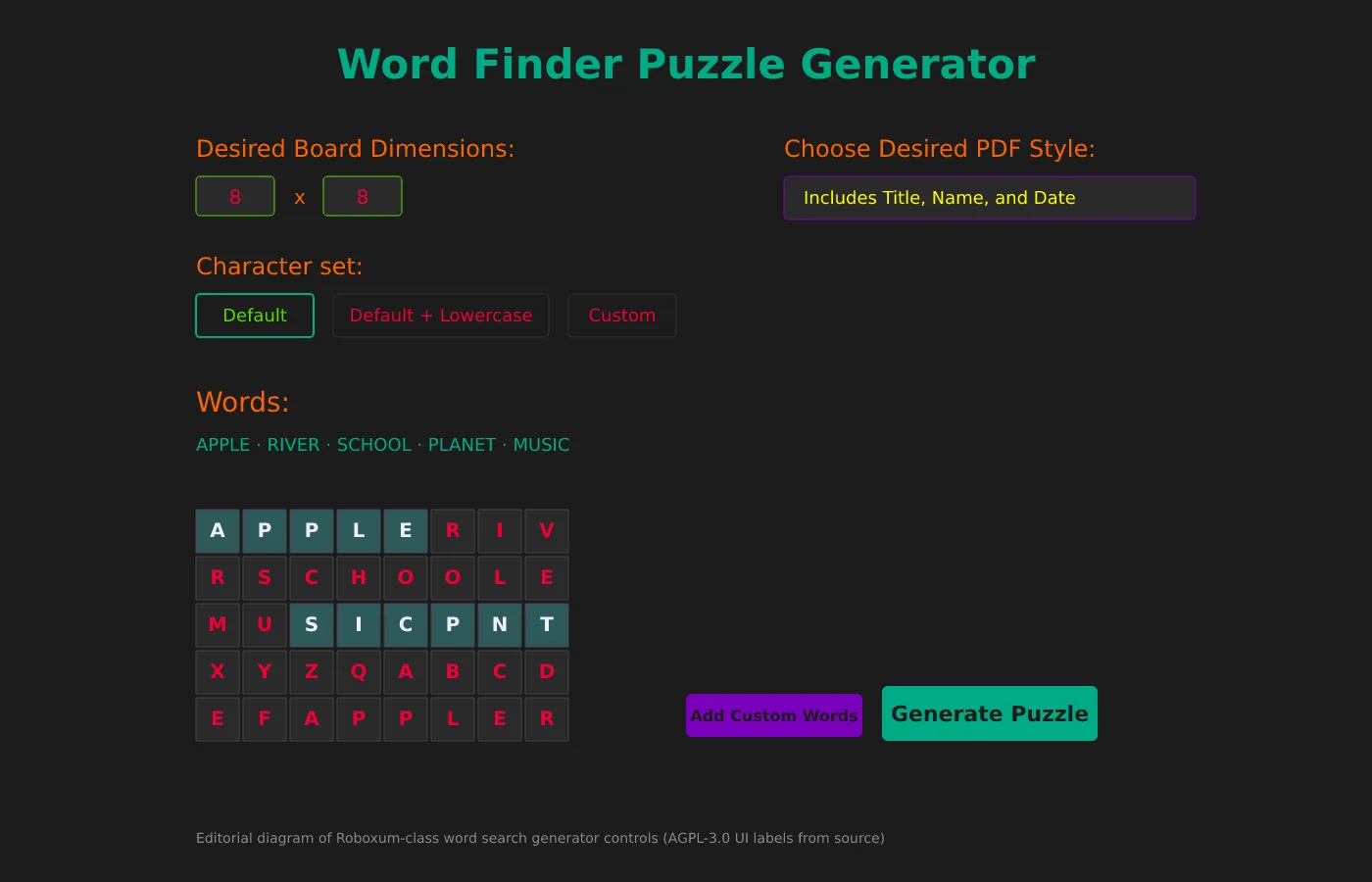
The first hour after a word search install should prove that Roboxum.exe opens, that a PDF lands beside the program, and that you know which GitHub zip you used. Skip character-set experiments until that proof exists.
These steps follow upstream README and main.py labels. Exact SmartScreen prompts remain UNVERIFIED because this research pass did not run the Windows zip on a live desk.
1. Confirm the Releases filename
Write Roboxum_*_Windows.64-bit.zip (or the 32-bit name) on the machine ticket. Open the extract folder and confirm Roboxum.exe sits beside wlen.dat.
2. Launch the generator window
Double-click Roboxum.exe. You should see the window title Roboxum and the heading Word Finder Puzzle Generator. If nothing opens, re-extract the zip from GitHub Releases rather than hunting a Softonic mirror.
3. Set Desired Board Dimensions
Pick a small grid for the first word search, such as an eight-by-eight field. Large boards can wait until you trust PDF margins on your printer.
4. Set Number of unique puzzles
Start with one puzzle. Raising the count creates multiple PDFs in one pass, which is useful later for class sets.
5. Leave Character set on Default
Default keeps uppercase letters. Default + Lowercase and Custom are power options after the first PDF works. Custom Filler Characters can stay blank so fillers are random.
6. Choose a simple PDF style
Pick Puzzle Fills Entire Page or Includes Title. Generate Puzzle. Confirm Puzzle.pdf appears in the program directory.
7. Add Custom Words for a real lesson
Open Add Custom Words, enter a short vocabulary list, and generate again. Words added earlier fit more reliably than words added last, per the upstream reminder text.
8. Optional character set and update door
Use Edit Character Set only when you need a custom alphabet in customCharacterSet.txt with no spaces or newlines. Bookmark GitHub Releases so the next word search update uses the same door.
Windows, macOS, and Linux notes
Windows desks should stay on the 64-bit zip unless they require 32-bit. macOS on the current tag should use Python source; the older MacOS zip is warned upstream. Linux uses python3 main.py after Tk and fpdf.
More guides: Windows, PDF styles, character sets, update and uninstall.
When something fails
If random generation complains about wlen.dat, restore that file beside the executable. If PDF style errors appear, pick a listed style from the OptionMenu. If antivirus quarantines the zip, re-download from github.com and compare the README SHA-256 when policy requires it.
Keep a browser word search tab as a temporary fallback for the class period, then return to the local generator once the folder is fixed.
Operational habits that keep word search installs honest
- Write the GitHub Releases URL on the machine ticket beside the extract folder.
- Prove one printable word search PDF with Default character set before editing customCharacterSet.txt.
- Keep a browser word search bookmark for guests without install rights.
- Pin the exact zip name when a new tag appears before imaging every lab PC.
Find Bind verifies asset names and README requirements for this word search guide. Upstream product bugs belong on the Roboxum issue tracker.
Printable word search packets without account walls
A local generator keeps vocabulary lists and PDF worksheets on disk you control. That matters when a browser word search maker changes layout the night before a quiz.
- Windows carts: prefer
Roboxum_*_Windows.64-bit.zipfrom GitHub Releases. - Linux and current macOS: Python source with Tk and fpdf, not invented store ids.
- Treat Softonic-class pages as distractors when people search for word search.
After every reimage, prove one short word search PDF before you call the cart ready for class.
Checklist for a clean word search desk
- Type github.com/NoahTroy/Roboxum/releases yourself.
- Prefer
Roboxum_*_Windows.64-bit.zipon current tags. - Extract so Roboxum.exe sits beside wlen.dat.
- Generate one small word search PDF before custom alphabets.
- Keep a browser fallback only for accounts without install rights.
Classroom carts should pin the zip name on the image ticket. After reimage, download again from Releases and prove Puzzle.pdf before the first period that needs worksheets.
Linux and current macOS desks stay on Python source with Tk and fpdf. That path still produces the same style of printable word search once the GUI opens. Avoid inventing Flatpak or Homebrew ids when registries have no match.
When search ads get in the way
Queries for word search still surface Softonic-class portals. Those pages can rename setups. Stay on the Releases list even when a portal claims the same filename. Hash checks from the README remain available when policy requires them.
Find Bind verifies asset names for this word search guide. Upstream bugs belong on the Roboxum issue tracker. Download buttons point at GitHub Releases for NoahTroy/Roboxum.